
System design
System Design Whiteboard
A whiteboard built for architecture, not stick figures. Drop real Postgres, Kafka and AWS icons, connect them with smart connectors, simulate traffic and write the design doc beside it, alone or with your team in real time.
- URL shortener
- Chat application
- Rate limiter
- Video streaming platform
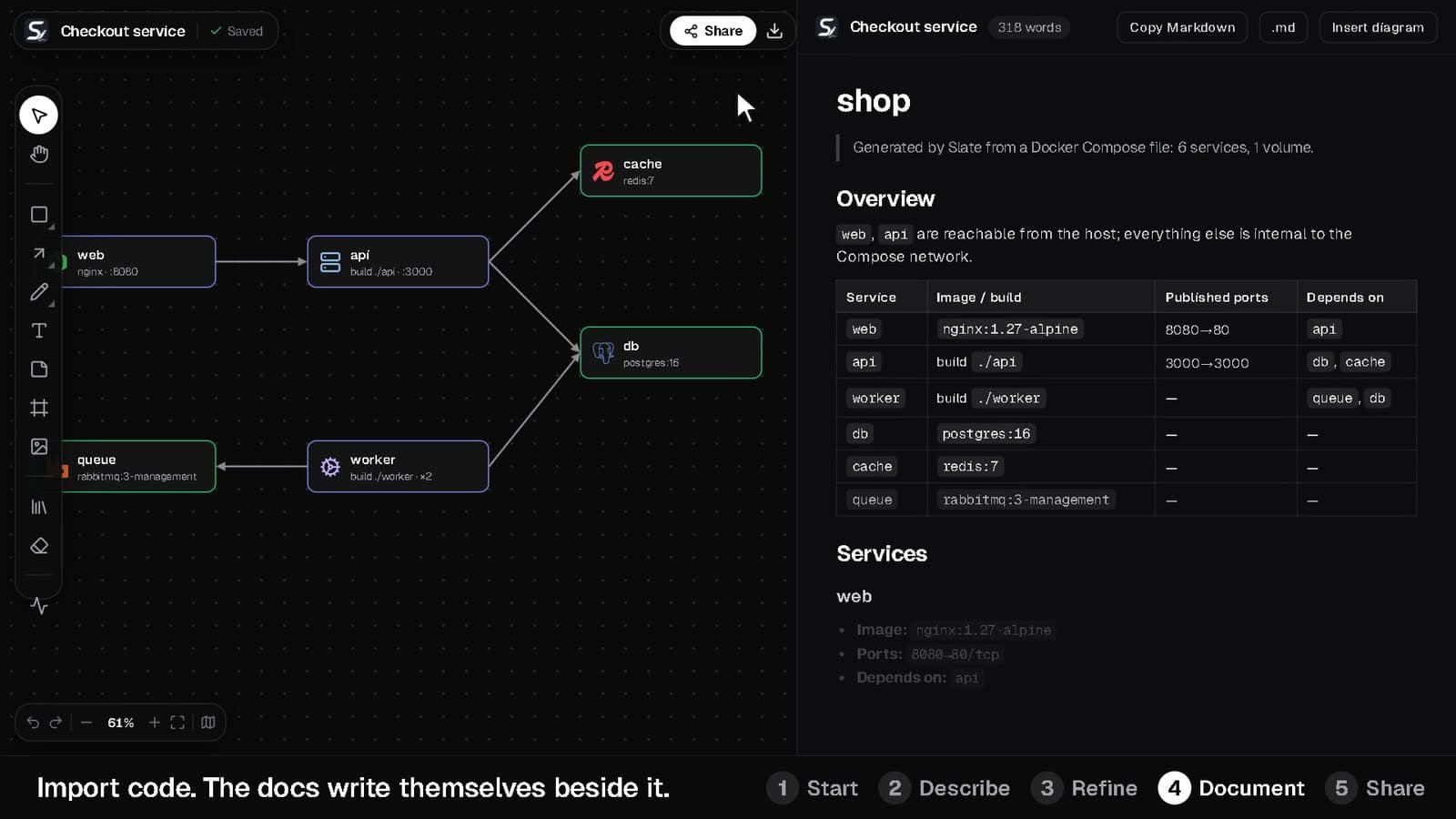
Everything a system design session needs, on one board
- 1
Start from a template
Begin with a template such as microservices e-commerce, an AWS three-tier web app, an event-driven order system, a RAG assistant or real-time chat, or from a blank canvas.
- 2
Draw with real components
Add product logos, AWS, GCP and Azure services and Lucide icons as node cards. Connectors in elbow, curve or straight style route around other nodes.
- 3
Test the design
Run the traffic simulator to watch requests flow along your arrows and see which components are single points of failure.
- 4
Write it up and share
Explain trade-offs in the markdown document next to the canvas, then share a link for the interviewer or your team.
Built for the way engineers design systems
Interview mode
A 45-minute countdown, a requirement checklist, a back-of-the-envelope scale calculator and an architecture review, either an instant structural check or a written AI review.
Traffic simulator
Animated packets flow along your arrows (amber for async links), and components that many others depend on, with no redundancy, get a pulsing single-point-of-failure badge.
AI diagrams
Describe a system and Slate AI draws a first version you can edit, so you start from a draft instead of an empty canvas.
Cloud cost estimate
A live monthly cost for the AWS, GCP and Azure services on the board, with cost-saving tips.
Docs beside the canvas
A rich-text document next to the board with a draggable split, a word count and one-click markdown copy or download.
Real-time collaboration
Live cursors with names, teammates' selections and per-element sync, so two people editing never overwrite each other.
System Design Whiteboard: common questions
Straight answers about how it works and what it costs.
What is a system design whiteboard?
A canvas for sketching how the parts of a software system fit together: services, databases, caches, queues and the traffic between them. Slate adds real product icons, simulation and documentation to that.
Can I use Slate to practice system design interviews?
Yes. Interview mode adds a 45-minute countdown, a requirement checklist, a scale calculator and an architecture review to any board.
Is there a free whiteboard with no sign-up?
Yes. The playground runs in your browser with no account and saves your board on your device. Sign up when you want it synced, shared or generated with AI.
Can my team collaborate on the same board?
Yes. Share an anyone-with-the-link URL (view or edit) or invite people to a workspace with roles. You'll see live cursors and selections as you work.
What does it cost?
The Free plan is free forever. Pro is ₹999 a month and Team is ₹1,999 per seat a month.
Start with a blank board, or with a prompt
The playground needs no account. A free account unlocks AI diagrams, sync and sharing.