
Import code
Docker Compose to Diagram
Paste a docker-compose.yml and get an architecture diagram of your services, plus the documentation that belongs beside it. Compose files are read by Slate's own parser, so the result is exact, instant and uses no AI credits.
How to convert docker-compose.yml to a diagram
- 1
Open a board
Sign in (a free account is enough), open or create a board and open the import-code dialog.
- 2
Paste your file
Paste a docker-compose.yml. Slate also accepts SQL schemas and directory trees, up to 60,000 characters.
- 3
Get the diagram
Each service becomes a node with a product icon recognised from its image, and depends_on becomes an arrow.
- 4
Get the docs
The document beside the board is filled in automatically: an overview, a table of services and the details of each one.
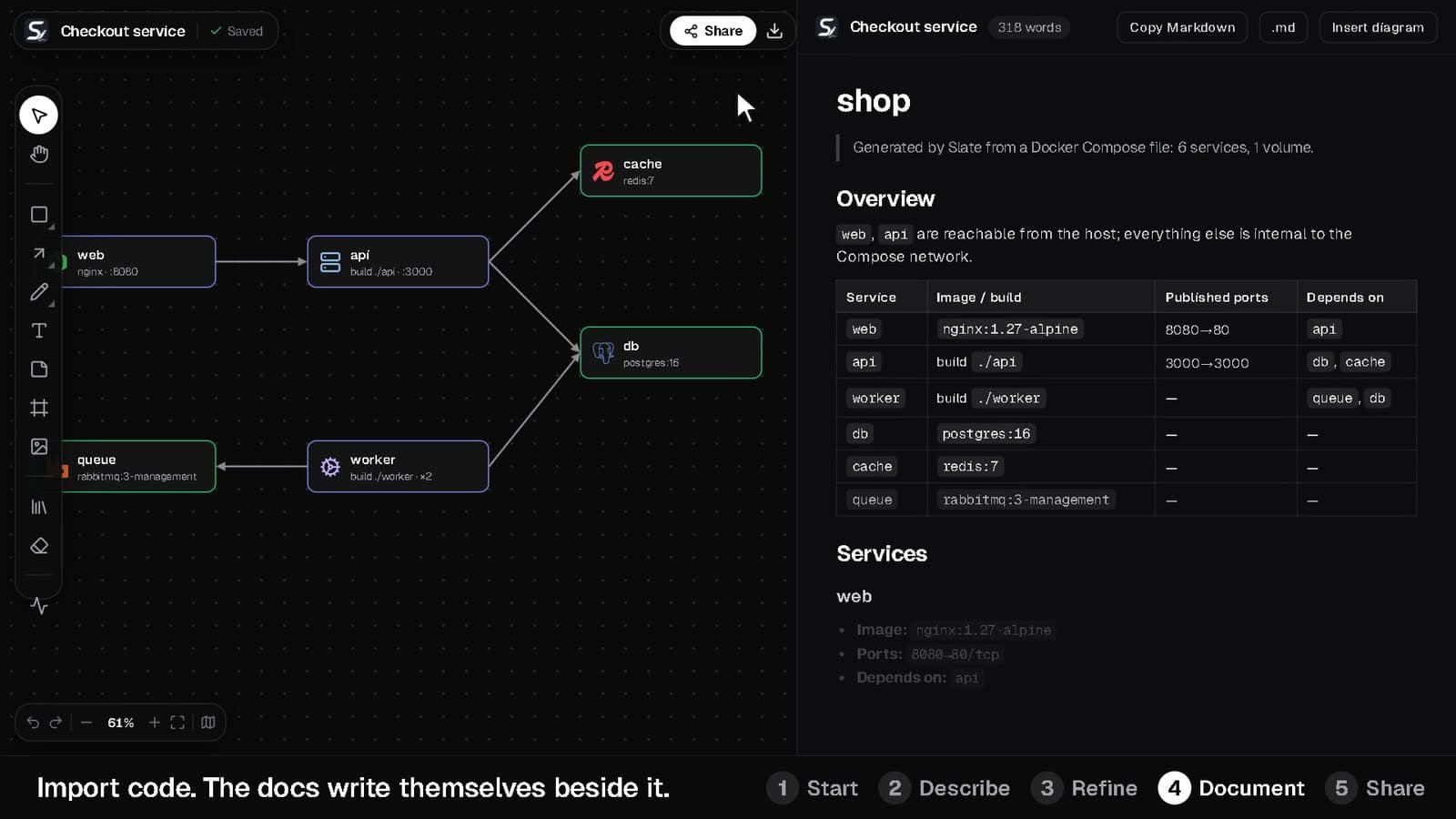
A compose file in, a diagram and docs out
This six-service stack is the one used in Slate's walkthrough video.
- A diagram with web, api, worker, db, cache and queue connected by their dependencies
- An overview that says which services are reachable from the host and which stay internal to the Compose network
- A table of image or build context, published ports and dependencies for every service
services:
  web:
    image: nginx:1.27-alpine
    ports: ["8080:80"]
    depends_on: [api]
  api:
    build: ./api
    ports: ["3000:3000"]
    depends_on: [db, cache]
  worker:
    build: ./worker
    depends_on: [queue, db]
  db:
    image: postgres:16
  cache:
    image: redis:7
  queue:
    image: rabbitmq:3-management
Why teams use it for onboarding and reviews
Exact, not guessed
Compose files, SQL DDL and directory trees are parsed by Slate itself rather than by a language model, so the same input always gives the same diagram.
No AI credits
Parsing these formats is free of AI credits. Other code can be imported through Slate AI, which does use a credit.
Docs that stay beside the diagram
The generated documentation lives in the markdown editor next to the board. Copy it or download it as a .md file.
SQL schema to ER diagram
Paste CREATE TABLE statements and get an entity-relationship diagram with the table documentation filled in.
Edit afterwards
The import is a normal board. Move nodes, add a load balancer, group services into frames or restyle it for a slide.
Share one link
Send teammates a view or edit link and review the stack together with live cursors.
Docker Compose to Diagram: common questions
Straight answers about how it works and what it costs.
How do I convert docker-compose.yml to a diagram?
Open any Slate board, open the import-code dialog, paste your docker-compose.yml and confirm. Slate draws one node per service, connects them by depends_on and writes the service documentation beside the board.
Does it use AI to read my compose file?
No. Docker Compose files, SQL schemas and directory trees are parsed by Slate's own parser, not by an AI model, so it's instant and doesn't spend AI credits.
What else can I import?
SQL schemas become ER diagrams and directory trees become structure diagrams. Anything else, such as Kubernetes manifests, Terraform or application code, is drawn by Slate AI.
Is it free?
Yes. The Free plan is free forever. Pro is ₹999 a month and Team is ₹1,999 per seat a month. Importing needs a free account; the playground lets you sketch on a board without one.
Can I export the diagram?
Yes. Export PNG (1x to 4x, transparent), SVG or JSON, or copy the image to your clipboard.
Start with a blank board, or with a prompt
The playground needs no account. A free account unlocks AI diagrams, sync and sharing.